Lost Your Link? We've Got You.
Recover your admin link in seconds using your Payment ID
Find Your Payment ID
After completing your payment, you will receive an email from Razorpay that clearly mentions your Payment ID.
💡 Tip: The email subject is usually "Payment Receipt" or "Payment Successful". The Payment ID looks like: pay_SA7ABC123XYZ
📧 Here's what the Razorpay email looks like:
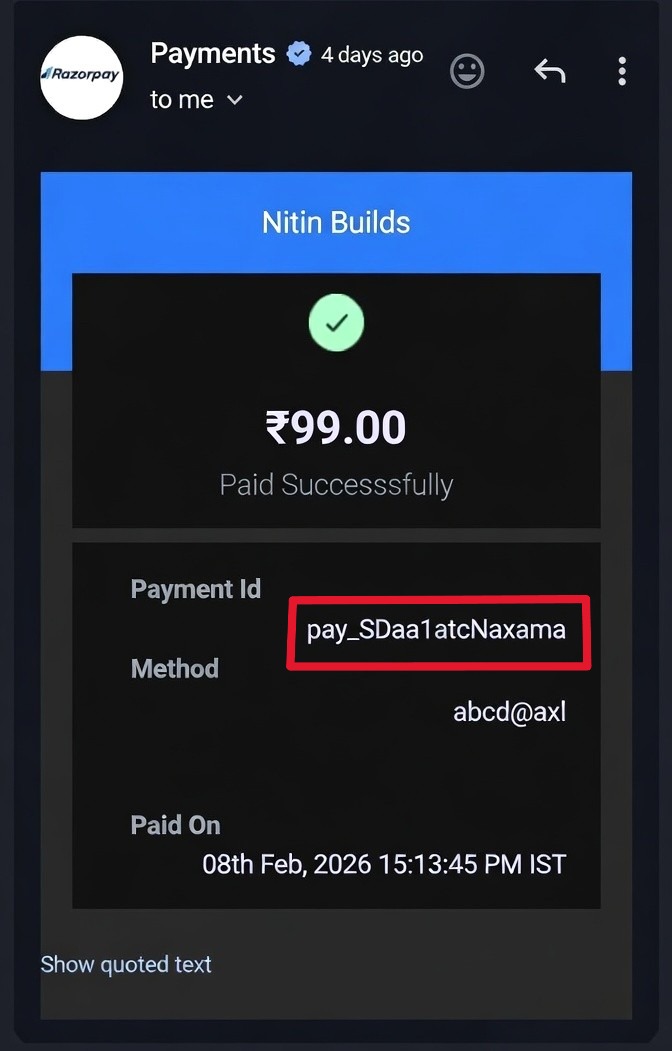
The Payment ID is highlighted in the email
Enter Your Payment ID
Example Payment ID:
pay_SA7ABC123XYZ456Still Having Trouble?
Don't worry! Our support team is here to help. Email us with your Payment ID and we'll manually recover your link for you.
📧Email SupportCommon Questions
Where do I find my Payment ID?
Check your email from Razorpay (the payment gateway). The subject line is usually "Payment Receipt" or "Payment Successful". The Payment ID is clearly mentioned in the email body.
What if I can't find the Razorpay email?
Check your spam/junk folder. Search for "Razorpay" or "Payment Receipt" in your email. If you still can't find it, contact our support team.
Is this recovery method secure?
Yes! Only you have access to your Razorpay receipt email. The Payment ID is unique to your purchase and acts as your secure key to access your admin panel.